· ReadyStack
Worked example
Real numbers from this tool, line by line.
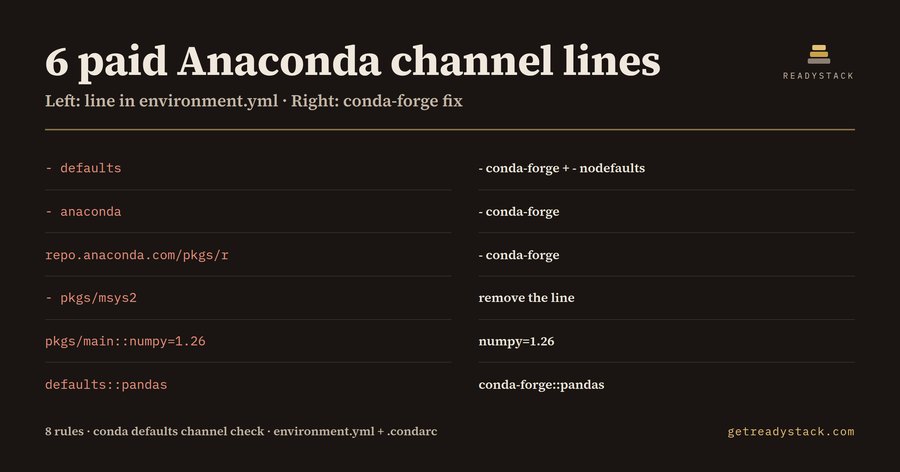
6 paid Anaconda channel lines sat in one churn-model environment.yml we linted — the kind of file a Python data team at a company with 200 or more people copies from repo to repo.
Anaconda's Terms of Service require a paid licence for organisations of 200 or more people that use the defaults channel. The anaconda channel on anaconda.org is a mirror of defaults and carries the same terms. conda-forge, bioconda and other community channels stay free. Anaconda lists its Business plan at $50 per user per month.
The file looked ordinary:
channels:
  - defaults
  - anaconda
  - https://repo.anaconda.com/pkgs/r
  - pkgs/msys2
dependencies:
  - python=3.11
  - pkgs/main::numpy=1.26
  - defaults::pandas
Conda License Lint reports 6 findings on it, one per line that reaches Anaconda's repository:
- L3 defaults-channel:
- defaultsis short-hand for repo.anaconda.com/pkgs/main and pkgs/r, plus pkgs/msys2 on Windows. - L4 anaconda-channel: the anaconda.org mirror of defaults.
- L5 repo-anaconda-url: a direct repo.anaconda.com URL.
- L6 pkgs-channel-name:
pkgs/msys2resolves to the same repository. - L9 and L10 channel-pinned-dependency:
pkgs/main::numpy=1.26anddefaults::pandas.
The two pins are the ones a quick search misses. A channel::package prefix tells conda where to fetch that one package, so it goes to Anaconda even after someone cleans up the channels list.
The fixed file lists - conda-forge and - nodefaults, pins conda-forge::pandas, and the linter reports 0 findings on it.
Why nodefaults matters: conda env create adds the channels from your conda configuration after the ones in the file. Miniconda and Anaconda installers put defaults there. So a file that lists only conda-forge still reaches defaults unless its list ends with - nodefaults. The linter flags that case as a warning, implicit-defaults, and points at the channels line.
The machine configuration is the other half. A .condarc with default_channels: pointing at repo.anaconda.com decides what the word defaults means on that machine. Each such entry is a condarc-default-channels finding. On the three-line Miniconda-style .condarc we tested, the linter reports 3 findings: the defaults channel and two default_channels URLs.
There is a CI angle too. Since Anaconda Distribution 2025.06-0 the installers ship the conda-anaconda-tos plugin, and the channels repo.anaconda.com/pkgs/main, pkgs/r and pkgs/msys2 need conda tos accept, or the CONDA_PLUGINS_AUTO_ACCEPT_TOS variable, before a non-interactive build uses them. A build that suddenly stops at a Terms of Service prompt is a sign the pipeline is still on defaults.
The 8 rules in the extension:
- defaults-channel
- anaconda-channel
- repo-anaconda-url
- pkgs-channel-name
- channel-pinned-dependency
- condarc-default-channels
- implicit-defaults (warning)
- mixed-with-conda-forge (warning)
Findings land in the VS Code Problems panel with the line number, the reason and the conda-forge replacement. The files it watches are environment*.yml, environment*.yaml, .condarc and condarc.
The free version checks the file you have open with no key, and the web page runs the same engine: paste a file, get the same findings. The full version scans every environment file and .condarc in a workspace in one run and exports a single licence-audit report you can hand to procurement or security.
It is not legal advice. Whether your organisation holds an Anaconda licence is between you and Anaconda; the linter shows which lines reach Anaconda's repository.
15 seconds — what it actually does
Questions people ask
What does Conda License Lint check in environment.yml and .condarc?
It runs 8 rules on conda files: defaults channel, anaconda mirror channel, repo.anaconda.com URLs, pkgs/main, pkgs/r and pkgs/msys2 short names, defaults:: or pkgs/main:: dependency pins, .condarc default_channels, a missing nodefaults line, and conda-forge mixed with an Anaconda channel. Each finding gives the line number, the reason and the conda-forge fix, in the Problems panel.
Who needs a conda channel licence check?
Python, data science and ML platform teams at companies, nonprofits or government bodies with 200 or more people, where Anaconda's Terms of Service require a paid licence to use the defaults channel. It suits the engineer who owns the environment.yml files, the Dockerfiles' conda step and the CI images, and has to answer a licence question from procurement or security.
Why not just ask a chatbot or grep for defaults?
A grep for defaults misses three things: dependency pins such as defaults::pandas or pkgs/main::numpy=1.26, the anaconda channel that mirrors defaults, and files with no nodefaults line, where conda env create still adds defaults from the conda configuration Miniconda installs. A chatbot reading one file does not see your .condarc. This linter checks every line by rule.
What is free and what does the full version add?
Free, with no key: every finding and fix for the environment.yml or .condarc open in the editor, and the same engine in the web version. The full version, one payment of $29, scans every environment file and .condarc in the workspace in one run and exports a single licence-audit report you keep for procurement or a security review.
What does the Anaconda licence cost compared with switching to conda-forge?
Anaconda lists its Business plan at $50 per user per month, and plans above 15 seats go to sales for custom pricing. conda-forge is free for everyone. Moving an environment file from defaults to conda-forge plus nodefaults is usually a few line edits once you know which lines reach repo.anaconda.com, which is what the linter lists.
Why not just ask ChatGPT or another AI chat?
A general AI chat answers from training data with a cutoff date, cannot read your repository and names no rule version. Conda License Lint: Anaconda defaults channel checks the file you open against 8 rules from a rule set dated 2026-09-27, and points at the exact line with the fix. For a filing, an audit or a client you need that dated result on your own files.
Ask about this tool
One question, answered by the person who built it. Your email only if you want the answer sent.