· ReadyStack
Worked example
Real numbers from this tool, line by line.
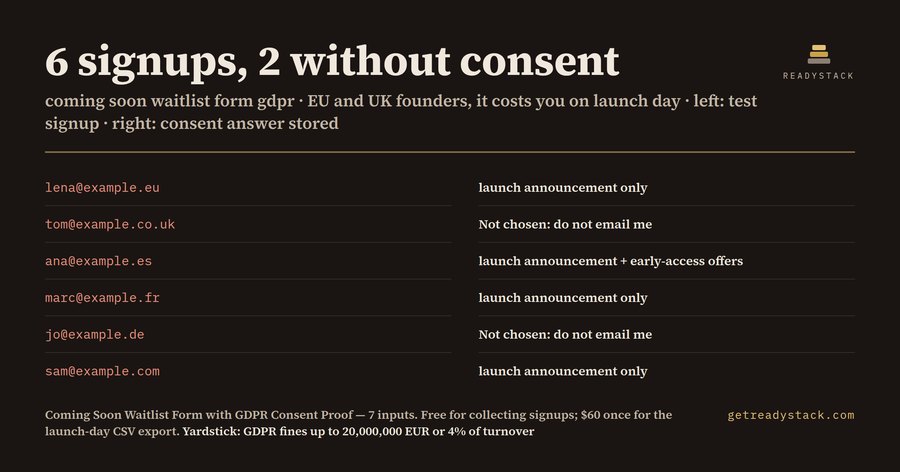
6 signups, 2 without consent: that is what a test coming-soon page waitlist showed. Those two are what a founder or agency in the EU or UK would be left holding if they emailed the whole list on launch day. We ran 6 signups through the free plugin. Four visitors picked a consent sentence; two left the answer at its default, "Not chosen: do not email me". Every row kept its created_at timestamp and the wording chosen:
| # | consent answer | |
|---|---|---|
| 1 | [email protected] | I agree: email me once when you launch. |
| 2 | [email protected] | Not chosen: do not email me |
| 3 | [email protected] | I agree: email me at launch and about early-access offers. |
| 4 | [email protected] | I agree: email me once when you launch. |
| 5 | [email protected] | Not chosen: do not email me |
| 6 | [email protected] | I agree: email me once when you launch. |
The two "Not chosen" rows are the people you must leave out of the launch email.
Why the default answer is "do not email me"
Many coming-soon subscribe boxes either store the address alone or put a pre-ticked box next to it. The Court of Justice of the EU held in Planet49 (C-673/17) that a pre-ticked box is not valid consent. So this form makes the visitor choose. The consent question has 3 answers and starts at "Not chosen". Only a visitor who actively picks one of the two "I agree" sentences counts as consenting, and the plugin stores that exact sentence in the row.
What GDPR asks you to be able to show
Art. 7(1) GDPR: where processing is based on consent, the controller shall be able to demonstrate that the data subject has consented. An address alone shows neither when someone agreed nor to what. Each row of this plugin has the date and time, the country the visitor chose, and the consent sentence itself. The two "I agree" sentences separate a single launch announcement from launch plus early-access offers, so the purpose is in the record too.
Breaching the conditions for consent sits in the higher fine tier of Art. 83(5)(a): up to 20,000,000 EUR or 4% of total worldwide annual turnover, whichever is higher.
What you set up: 7 inputs, 4 settings, 3 steps
The form has 7 inputs: email, first name, company, country, what the product should do for the visitor, how they heard about you, and the consent answer. Email, country and consent are required. The 4 settings are who collects the emails, the privacy notice link, the planned launch date, and the address for alerts. The first three are printed above the form. Setup is 3 steps: upload the zip, activate it, and paste the shortcode on your coming-soon or maintenance page. A nonce check and a honeypot sit on every submission.
Free vs full version
The free plugin is complete for collecting and keeping the record: the admin list shows every signup with its consent wording, 50 per page. The full version is for taking the list out of WordPress on launch day. It adds a CSV with id, created_at, all 7 inputs and the waitlist name, a receipt email to the subscriber, a new-signup alert, search by email, and one waitlist per product.
Try it with your own details
The free web page takes your company name, privacy link, launch date and one test signup. It shows the exact row the plugin would store and whether you may email that person at launch.
15 seconds — what it actually does
Questions people ask
What does the Coming Soon Waitlist Form with GDPR Consent Proof do?
It adds a waitlist form to your coming-soon or maintenance page with one shortcode. The consent question starts at 'Not chosen: do not email me', so consent only counts when the visitor picks one of two wordings. Each signup is saved with its date and time and the wording chosen, the record GDPR Art. 7(1) expects you to be able to show.
Who is this waitlist plugin for?
Founders, agencies and freelancers who put a WordPress site into coming-soon or maintenance mode before a launch, collect emails from EU, EEA or UK visitors, and need to show each person's consent later. That could be for a client, an auditor or a data-protection authority asking for proof.
Why not just use the subscribe box that comes with a free coming-soon plugin?
Many built-in subscribe boxes store only the address, and a pre-ticked box is not valid consent (CJEU Planet49, C-673/17). Art. 7(1) GDPR says you must be able to demonstrate consent. This form starts at 'do not email me' and stores the sentence each person actively chose.
What does the free version do on its own?
The free plugin is complete for collecting: a form with 7 inputs and consent off by default, 4 settings (who collects, privacy link, launch date, alert address), honeypot and nonce checks, and the admin list of every signup with its consent wording, 50 per page. Setup takes 3 steps. Nothing is time-limited and no entries are hidden.
What does the paid version add, and what is at stake?
The paid version adds a launch-day CSV with the date and time of every signup, a receipt email to the subscriber, a new-signup alert, search by email and one waitlist per product. Under Art. 83(5)(a) GDPR, breaching the conditions for consent can be fined up to 20,000,000 EUR or 4% of worldwide turnover.
Ask about this tool
One question, answered by the person who built it. Your email only if you want the answer sent.