Claude Code skills · updated 2026-10-03
Xcode 26 upload skill for Claude Code — runner images, Xcode pins
Shows which Xcode every iOS job in your GitHub Actions really builds with
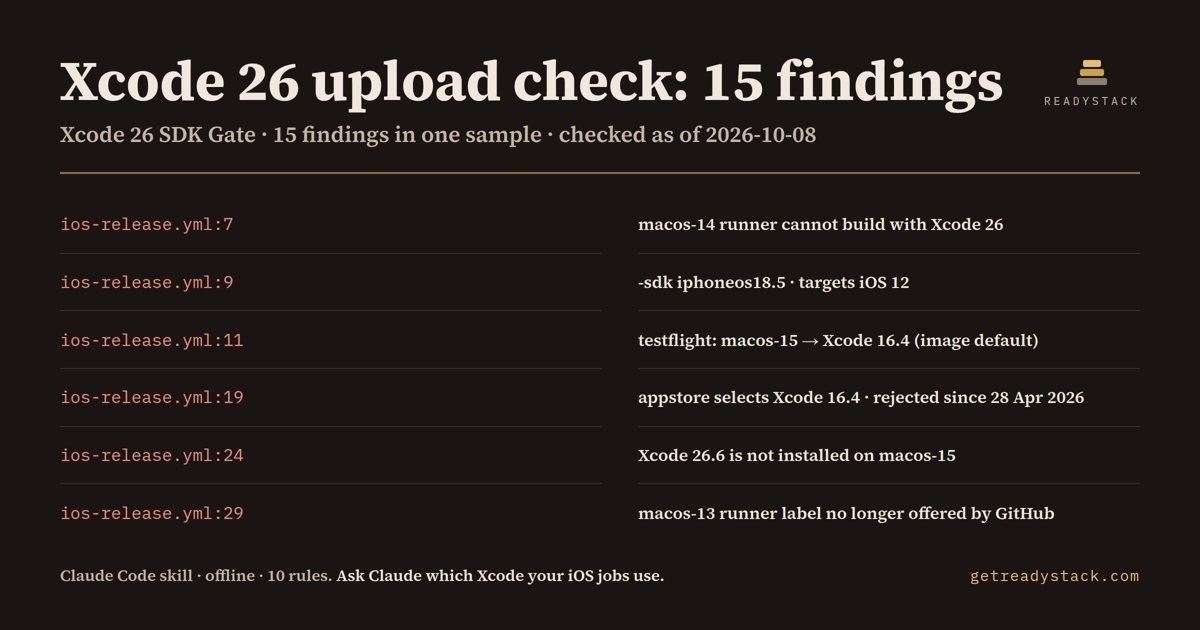
On one 36-line iOS release workflow it printed 15 findings (7 errors, 1 warning, 7 info) from 10 rules, each with file:line and the fix.
Get it on Whop - $12 onceGet it on Gumroad
Who it's for
For iOS and Flutter teams whose TestFlight and App Store builds are archived and uploaded from GitHub Actions macOS runners.
What breaks, and when
Since 28 Apr 2026 App Store Connect requires Xcode 26 with an iOS 26 SDK; macos-15 defaults to Xcode 16.4, and GitHub retires macos-14 on 2 Nov 2026.
What it printed on the bundled example
== Xcode 26 SDK Gate for GitHub Actions — 15 findings (7 errors, 1 warning, 7 info) in 1 file · 10 rules
  ERROR .github/workflows/ios-release.yml:7  [runner-macos-14]
        macos-14 runner cannot build with Xcode 26 — job "archive-legacy" builds with Xcode 15.4 · Fix: runs-on: macos-26
        fix: runs-on: macos-26
  INFO  .github/workflows/ios-release.yml:7  [job-xcode-map]
        job "archive-legacy" → macos-14 → Xcode 15.4 (image default) → rejected by App Store Connect since 28 Apr 2026
  ERROR .github/workflows/ios-release.yml:9  [deployment-target-below-13]
        iOS deployment target below 13 — targets iOS 12 · Fix: IPHONEOS_DEPLOYMENT_TARGET=13.0 (or higher)
        fix: IPHONEOS_DEPLOYMENT_TARGET=13.0 (or higher)
What you get
- A scanner Claude runs over every workflow file - not a guess from memory
- 10 dated rules: macos-14/13 labels, macos-15 default Xcode 16.4, pins below 26, -sdk below 26, iOS target below 13
- One line per Apple build job: runner → Xcode → accepted or rejected
- Claude proposes the edits and applies them only after you say yes; exit 1 in CI on any error
Install
Unzip into ~/.claude/skills/ (all projects) or your-repo/.claude/skills/ (one repo), then ask Claude Code: "Our iOS release runs on GitHub Actions and I'm not sure every job archives with Xcode 26 now that App Store Connect requires it. Can you go through our workflows and tell me which Xcode each job really uses? Don't edit anything yet.". Needs Node 16+.
unzip xcode-26-upload-check.zip -d ~/.claude/skills/
Ask Claude
“Our iOS release runs on GitHub Actions and I'm not sure every job archives with Xcode 26 now that App Store Connect requires it. Can you go through our workflows and tell me which Xcode each job really uses? Don't edit anything yet.”
What it does not do
Reads workflow YAML only; it does not run xcodebuild, read .xcodeproj settings or contact GitHub or Apple.
FAQ
What is a Claude Code skill?
A folder with a SKILL.md and scripts that Claude Code loads when your request matches it. You ask in plain words and Claude runs the scanner the skill carries.
How is this different from asking Claude without the skill?
The skill carries a dated rule table and a scanner that reads every file, so Claude quotes the exact date and line instead of answering from memory.
Does it send my code anywhere?
Reads workflow YAML only; it does not run xcodebuild, read .xcodeproj settings or contact GitHub or Apple.
How do I install it?
Unzip into ~/.claude/skills/ (all projects) or your-repo/.claude/skills/ (one repo), then ask Claude Code: "Our iOS release runs on GitHub Actions and I'm not sure every job archives with Xcode 26 now that App Store Connect requires it. Can you go through our workflows and tell me which Xcode each job really uses? Don't edit anything yet.". Needs Node 16+.
What do I get when I buy?
The zip. On Whop it is in your library as a download lesson with the zip attached; on Gumroad it is the product file.